mirror of
https://github.com/ocornut/imgui.git
synced 2026-01-09 23:54:20 +00:00

630 lines
30 KiB
Markdown
630 lines
30 KiB
Markdown
_(You may browse this at https://github.com/ocornut/imgui/blob/master/docs/FONTS.md or view this file with any Markdown viewer)_
|
|
|
|
## Dear ImGui: Using Fonts
|
|
|
|
The code in Dear ImGui embeds a copy of [ProggyClean.ttf](https://github.com/bluescan/proggyfonts) by Tristan Grimmer,
|
|
a 13 pixels high, pixel-perfect font used by default. ProggyClean does not scale very nicely.
|
|
|
|
The code in Dear ImGui embeds a partial copy of [ProggyVector.ttf](https://github.com/bluescan/proggyfonts) by Tristan Grimmer and Source Foundry Authors,
|
|
a font mimicking ProggyClean which does scale nicely.
|
|
|
|
We embed fonts in the code so you can use Dear ImGui without any file system access.
|
|
If you use either of those fonts in your shipping product you should include their license as part of your software (see below for links).
|
|
If you don't use them you can set `IMGUI_DISABLE_DEFAULT_FONT` in your [imconfig.h](https://github.com/ocornut/imgui/blob/master/imconfig.h) file to ship binaries without the fonts and save about ~26 KB.
|
|
|
|
You may also load external .TTF/.OTF files, see instructions on this page.
|
|
In the [misc/fonts/](https://github.com/ocornut/imgui/tree/master/misc/fonts) folder you can find a few suggested fonts, provided as a convenience.
|
|
|
|
**Also read the FAQ:** https://www.dearimgui.com/faq (there is a Fonts section!)
|
|
|
|
## Index
|
|
- [Troubleshooting](#troubleshooting)
|
|
- [New! Dynamic Fonts system in 1.92 (June 2025)](#new-dynamic-fonts-system-in-192-june-2025)
|
|
- [How should I handle DPI in my application?](#how-should-i-handle-dpi-in-my-application)
|
|
- [Fonts Loading Instructions](#fonts-loading-instructions)
|
|
- [Loading Font Data from Memory](#loading-font-data-from-memory)
|
|
- [Loading Font Data Embedded In Source Code](#loading-font-data-embedded-in-source-code)
|
|
- [Using Icon Fonts](#using-icon-fonts)
|
|
- [Excluding Overlapping Ranges](#excluding-overlapping-ranges)
|
|
- [Using FreeType Rasterizer (imgui_freetype)](#using-freetype-rasterizer-imgui_freetype)
|
|
- [Using Colorful Glyphs/Emojis](#using-colorful-glyphsemojis)
|
|
- [Using Custom Glyph Ranges](#using-custom-glyph-ranges)
|
|
- [Using Custom Colorful Icons](#using-custom-colorful-icons)
|
|
- [About Filenames](#about-filenames)
|
|
- [About UTF-8 Encoding](#about-utf-8-encoding)
|
|
- [Debug Tools](#debug-tools)
|
|
- [Credits/Licenses For Fonts Included In Repository](#creditslicenses-for-fonts-included-in-repository)
|
|
- [Font Links](#font-links)
|
|
|
|
---------------------------------------
|
|
|
|
## Troubleshooting
|
|
|
|
**A vast majority of font and text related issues encountered comes from 4 things:**
|
|
|
|
### (1) Invalid filename due to use of `\` or unexpected working directory.
|
|
|
|
See [About Filenames](#about-filenames). AddFontXXX() functions should assert if the filename is incorrect.
|
|
|
|
### (2) Invalid UTF-8 encoding of your non-ASCII strings.
|
|
|
|
See [About UTF-8 Encoding](#about-utf-8-encoding). Use the encoding viewer to confirm encoding of string literal in your source code is correct.
|
|
|
|
### (3) Missing glyph ranges.
|
|
|
|
🆕 **Since 1.92, with an up to date backend: specifying glyph ranges is unnecessary.**
|
|
|
|
⏪ Before 1.92: you need to load a font with explicit glyph ranges if you want to use non-ASCII characters. See [Fonts Loading Instructions](#fonts-loading-instructions). Use [Debug Tools](#debug-tools) confirm loaded fonts and loaded glyph ranges.
|
|
|
|
This was a previous constraint of Dear ImGui (lifted in 1.92): when loading a font you need to specify which characters glyphs to load.
|
|
All loaded fonts glyphs are rendered into a single texture atlas ahead of time. Calling either of `io.Fonts->GetTexDataAsAlpha8()`, `io.Fonts->GetTexDataAsRGBA32()` or `io.Fonts->Build()` will build the atlas. This is generally called by the Renderer backend, e.g. `ImGui_ImplDX11_NewFrame()` calls it. **If you use custom glyphs ranges, make sure the array is persistent** and available during the calls to `GetTexDataAsAlpha8()/GetTexDataAsRGBA32()/Build()`.
|
|
|
|
### (4) Font atlas texture fails to upload to GPU.
|
|
|
|
🆕 **Since 1.92, with an up to date backend: atlas is built incrementally and dynamically resized, this is less likely to happen**
|
|
|
|
:rewind: This is often of byproduct of point 3. If you have large number of glyphs or multiple fonts, the texture may become too big for your graphics API. **The typical result of failing to upload a texture is if every glyph or everything appears as empty white rectangles.** Mind the fact that some graphics drivers have texture size limitation. If you are building a PC application, mind the fact that your users may use hardware with lower limitations than yours.
|
|
|
|

|
|
|
|
Some solutions:
|
|
- You may reduce oversampling, e.g. `font_config.OversampleH = 1`, this will half your texture size for a quality loss.
|
|
Note that while OversampleH = 2 looks visibly very close to 3 in most situations, with OversampleH = 1 the quality drop will be noticeable. Read about oversampling [here](https://github.com/nothings/stb/blob/master/tests/oversample).
|
|
- Reduce glyphs ranges by calculating them from source localization data.
|
|
You can use the `ImFontGlyphRangesBuilder` for this purpose and rebuilding your atlas between frames when new characters are needed. This will be the biggest win!
|
|
- Set `io.Fonts.Flags |= ImFontAtlasFlags_NoPowerOfTwoHeight;` to disable rounding the texture height to the next power of two.
|
|
|
|
##### [Return to Index](#index)
|
|
|
|
---------------------------------------
|
|
|
|
## New! Dynamic Fonts system in 1.92 (June 2025)
|
|
|
|
v1.92 introduces a newer, dynamic font system. It requires backend to support the `ImGuiBackendFlags_HasTextures` feature:
|
|
- Users of icons, Asian and non-English languages do not need to pre-build all glyphs ahead of time. Saving on loading time, memory, and also reducing issues with missing glyphs. Specifying glyph ranges is not needed anymore.
|
|
- `PushFont(NULL, new_size)` may be used anytime to change font size.
|
|
- Packing custom rectangles is more convenient as pixels may be written to immediately.
|
|
- Any update to fonts previously required backend specific calls to re-upload the texture, and said calls were not portable across backends. It is now possible to scale fonts etc. in a way that doesn't require you to make backend-specific calls.
|
|
- It is possible to plug a custom loader/backend to any font source.
|
|
|
|
See [#8465](https://github.com/ocornut/imgui/issues/8465) for more details.
|
|
|
|
|
|
##### [Return to Index](#index)
|
|
|
|
---------------------------------------
|
|
|
|
## How should I handle DPI in my application?
|
|
|
|
Since 1.92, with an updated backend, you can set `style.FontScaleDpi = your_content_scale;` to scale all fonts.
|
|
<BR>You can call `style.ScaleAllSizes(xxx)` at init time or every frame at the beginning of your main loop to scale sizes/paddings.
|
|
<BR>Since 1.92, with an updated backend, macOS style pixel/backing style scale is automatically handled.
|
|
<BR>See [FAQ entry](https://github.com/ocornut/imgui/blob/master/docs/FAQ.md#q-how-should-i-handle-dpi-in-my-application) for more details.
|
|
|
|
##### [Return to Index](#index)
|
|
|
|
---------------------------------------
|
|
|
|
## Fonts Loading Instructions
|
|
|
|
**Select base size**
|
|
```cpp
|
|
ImGuiStyle& style = ImGui::GetStyle();
|
|
style.FontSizeBase = 20.0f;
|
|
```
|
|
|
|
**Load default font:**
|
|
```cpp
|
|
ImGuiIO& io = ImGui::GetIO();
|
|
io.Fonts->AddFontDefault(); // Load embedded font (auto-selected).
|
|
```
|
|
```cpp
|
|
io.Fonts->AddFontDefaultVector(); // Load embedded scalable font.
|
|
```
|
|
```cpp
|
|
io.Fonts->AddFontDefaultBitmap(); // Load embedded bitmap font (legacy).
|
|
```
|
|
|
|
**Load .TTF/.OTF file with:**
|
|
|
|
🆕 **Since 1.92, with an up to date backend: passing a size is not necessary**
|
|
```cpp
|
|
ImGuiIO& io = ImGui::GetIO();
|
|
io.Fonts->AddFontFromFileTTF("font.ttf");
|
|
```
|
|
:rewind: **Before 1.92, or without an up to date backend:**
|
|
```cpp
|
|
ImGuiIO& io = ImGui::GetIO();
|
|
io.Fonts->AddFontFromFileTTF("font.ttf", size_pixels);
|
|
```
|
|
If you get an assert stating "Could not load font file!", your font filename is likely incorrect. Read [About filenames](#about-filenames) carefully.
|
|
|
|
**Load multiple fonts:**
|
|
```cpp
|
|
// Init
|
|
ImGuiIO& io = ImGui::GetIO();
|
|
ImFont* font1 = io.Fonts->AddFontFromFileTTF("font.ttf",);
|
|
ImFont* font2 = io.Fonts->AddFontFromFileTTF("anotherfont.otf");
|
|
```
|
|
|
|
In your application loop, select which font to use:
|
|
```cpp
|
|
ImGui::Text("Hello"); // use the default font (which is the first loaded font)
|
|
ImGui::PushFont(font2, 0.0f); // change font, keep current size
|
|
ImGui::Text("Hello with another font");
|
|
ImGui::PopFont();
|
|
```
|
|
|
|
**For advanced options create a ImFontConfig structure and pass it to the AddFont() function (it will be copied internally):**
|
|
```cpp
|
|
ImFontConfig config;
|
|
config.OversampleH = 1.0f;
|
|
ImFont* font = io.Fonts->AddFontFromFileTTF("font.ttf", size_pixels, &config);
|
|
```
|
|
|
|
**Combine multiple fonts into one:**
|
|
|
|
🆕 **Since 1.92, with an up to date backend: specifying glyph ranges is unnecessary.**
|
|
```cpp
|
|
// Load a first font
|
|
ImFont* font = io.Fonts->AddFontDefault();
|
|
ImFontConfig config;
|
|
config.MergeMode = true;
|
|
io.Fonts->AddFontFromFileTTF("DroidSans.ttf", 0.0f, &config); // Merge into first font to add e.g. Asian characters
|
|
io.Fonts->AddFontFromFileTTF("fontawesome-webfont.ttf", 0.0f, &config); // Merge into first font to add Icons
|
|
```
|
|
:rewind: **Before 1.92, or without an up to date backend:**
|
|
```cpp
|
|
// Load a first font
|
|
ImFont* font = io.Fonts->AddFontDefault();
|
|
|
|
// Add character ranges and merge into the previous font
|
|
// The ranges array is not copied by the AddFont* functions and is used lazily
|
|
// so ensure it is available at the time of building or calling GetTexDataAsRGBA32().
|
|
static const ImWchar icons_ranges[] = { 0xf000, 0xf3ff, 0 }; // Will not be copied by AddFont* so keep in scope.
|
|
ImFontConfig config;
|
|
config.MergeMode = true;
|
|
io.Fonts->AddFontFromFileTTF("DroidSans.ttf", 18.0f, &config, io.Fonts->GetGlyphRangesJapanese()); // Merge into first font
|
|
io.Fonts->AddFontFromFileTTF("fontawesome-webfont.ttf", 18.0f, &config, icons_ranges); // Merge into first font
|
|
io.Fonts->Build();
|
|
```
|
|
|
|
**Add a fourth parameter to bake specific font ranges only:**
|
|
|
|
🆕 **Since 1.92, with an up to date backend: specifying glyph ranges is unnecessary. All the GetGlyphRangesXXX() functions are marked obsolete.**
|
|
```cpp
|
|
// Basic Latin, Extended Latin
|
|
io.Fonts->AddFontFromFileTTF("font.ttf", size_pixels, nullptr, io.Fonts->GetGlyphRangesDefault());
|
|
|
|
// Default + Selection of 2500 Ideographs used by Simplified Chinese
|
|
io.Fonts->AddFontFromFileTTF("font.ttf", size_pixels, nullptr, io.Fonts->GetGlyphRangesChineseSimplifiedCommon());
|
|
|
|
// Default + Hiragana, Katakana, Half-Width, Selection of 1946 Ideographs
|
|
io.Fonts->AddFontFromFileTTF("font.ttf", size_pixels, nullptr, io.Fonts->GetGlyphRangesJapanese());
|
|
```
|
|
See [Using Custom Glyph Ranges](#using-custom-glyph-ranges) section to create your own ranges.
|
|
|
|
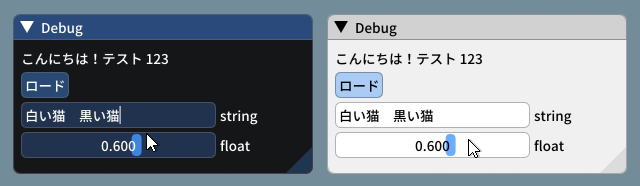
**Example loading and using a Japanese font:**
|
|
|
|
🆕 **Since 1.92, with an up to date backend:**
|
|
```cpp
|
|
ImGuiIO& io = ImGui::GetIO();
|
|
io.Fonts->AddFontFromFileTTF("NotoSansCJKjp-Medium.otf");
|
|
```
|
|
|
|
:rewind: **Before 1.92, or without an up to date backend:**
|
|
```cpp
|
|
ImGuiIO& io = ImGui::GetIO();
|
|
io.Fonts->AddFontFromFileTTF("NotoSansCJKjp-Medium.otf", 20.0f, nullptr, io.Fonts->GetGlyphRangesJapanese());
|
|
```
|
|
|
|
```cpp
|
|
ImGui::Text(u8"こんにちは!テスト %d", 123);
|
|
if (ImGui::Button(u8"ロード"))
|
|
{
|
|
// do stuff
|
|
}
|
|
ImGui::InputText("string", buf, IM_COUNTOF(buf));
|
|
ImGui::SliderFloat("float", &f, 0.0f, 1.0f);
|
|
```
|
|
|
|
|
|
<br>_(settings: Dark style (left), Light style (right) / Font: NotoSansCJKjp-Medium, 20px / Rounding: 5)_
|
|
|
|
##### [Return to Index](#index)
|
|
|
|
---------------------------------------
|
|
|
|
## Loading Font Data from Memory
|
|
|
|
```cpp
|
|
ImFont* font = io.Fonts->AddFontFromMemoryTTF(data, data_size, size_pixels, ...);
|
|
```
|
|
|
|
IMPORTANT: `AddFontFromMemoryTTF()` by default transfer ownership of the data buffer to the font atlas, which will attempt to free it on destruction.
|
|
This was to avoid an unnecessary copy, and is perhaps not a good API (a future version will redesign it).
|
|
If you want to keep ownership of the data and free it yourself, you need to clear the `FontDataOwnedByAtlas` field:
|
|
|
|
```cpp
|
|
ImFontConfig font_cfg;
|
|
font_cfg.FontDataOwnedByAtlas = false;
|
|
ImFont* font = io.Fonts->AddFontFromMemoryTTF(data, data_size, size_pixels, &font_cfg);
|
|
```
|
|
IMPORTANT: Since 1.92, when using `FontDataOwnedByAtlas = false`, font data needs to available until `atlas->RemoveFont()`, or more typically until a shutdown of the owning context or font atlas. It was not immediately noticeable in 1.92.0 due to a bug in handling `FontDataOwnedByAtlas = false`, which was fixed in 1.92.6.
|
|
|
|
##### [Return to Index](#index)
|
|
|
|
---------------------------------------
|
|
|
|
## Loading Font Data Embedded In Source Code
|
|
|
|
- Compile and use [binary_to_compressed_c.cpp](https://github.com/ocornut/imgui/blob/master/misc/fonts/binary_to_compressed_c.cpp) to create a compressed C style array that you can embed in source code.
|
|
- See the documentation in [binary_to_compressed_c.cpp](https://github.com/ocornut/imgui/blob/master/misc/fonts/binary_to_compressed_c.cpp) for instructions on how to use the tool.
|
|
- You may find a precompiled version binary_to_compressed_c.exe for Windows inside the demo binaries package (see [README](https://github.com/ocornut/imgui/blob/master/docs/README.md)).
|
|
- The tool can optionally output Base85 encoding to reduce the size of _source code_ but the read-only arrays in the actual binary will be about 20% bigger.
|
|
|
|
Then load the font with:
|
|
```cpp
|
|
ImFont* font = io.Fonts->AddFontFromMemoryCompressedTTF(compressed_data, compressed_data_size, size_pixels, ...);
|
|
```
|
|
or
|
|
```cpp
|
|
ImFont* font = io.Fonts->AddFontFromMemoryCompressedBase85TTF(compressed_data_base85, size_pixels, ...);
|
|
```
|
|
|
|
##### [Return to Index](#index)
|
|
|
|
---------------------------------------
|
|
|
|
## Using Icon Fonts
|
|
|
|
Using an icon font (such as [FontAwesome](http://fontawesome.io) or [OpenFontIcons](https://github.com/traverseda/OpenFontIcons)) is an easy and practical way to use icons in your Dear ImGui application.
|
|
A common pattern is to merge the icon font within your main font, so you can embed icons directly from your strings without having to change fonts back and forth.
|
|
|
|
To refer to the icon UTF-8 codepoints from your C++ code, you may use those headers files created by Juliette Foucaut: https://github.com/juliettef/IconFontCppHeaders.
|
|
|
|
So you can use `ICON_FA_SEARCH` as a string that will render as a "Search" icon.
|
|
|
|
🆕 **Since 1.92, with an up to date backend: specifying glyph ranges is unnecessary. You can omit this parameter.**
|
|
Example Setup:
|
|
```cpp
|
|
// Merge icons into default tool font
|
|
#include "IconsFontAwesome.h"
|
|
ImGuiIO& io = ImGui::GetIO();
|
|
io.Fonts->AddFontDefault();
|
|
ImFontConfig config;
|
|
config.MergeMode = true;
|
|
config.GlyphMinAdvanceX = 13.0f; // Use if you want to make the icon monospaced
|
|
io.Fonts->AddFontFromFileTTF("fonts/fontawesome-webfont.ttf", 13.0f, &config);
|
|
```
|
|
:rewind: **Before 1.92:**
|
|
```cpp
|
|
// Merge icons into default tool font
|
|
#include "IconsFontAwesome.h"
|
|
ImGuiIO& io = ImGui::GetIO();
|
|
io.Fonts->AddFontDefault();
|
|
|
|
ImFontConfig config;
|
|
config.MergeMode = true;
|
|
config.GlyphMinAdvanceX = 13.0f; // Use if you want to make the icon monospaced
|
|
static const ImWchar icon_ranges[] = { ICON_MIN_FA, ICON_MAX_FA, 0 };
|
|
io.Fonts->AddFontFromFileTTF("fonts/fontawesome-webfont.ttf", 13.0f, &config, icon_ranges);
|
|
```
|
|
Example Usage:
|
|
```cpp
|
|
// Usage, e.g.
|
|
ImGui::Text("%s among %d items", ICON_FA_SEARCH, count);
|
|
ImGui::Button(ICON_FA_SEARCH " Search");
|
|
// C string _literals_ can be concatenated at compilation time, e.g. "hello" " world"
|
|
// ICON_FA_SEARCH is defined as a string literal so this is the same as "A" "B" becoming "AB"
|
|
```
|
|
See Links below for other icons fonts and related tools.
|
|
|
|
**Monospace Icons?**
|
|
|
|
To make your icon look more monospace and facilitate alignment, you may want to set the `ImFontConfig::GlyphMinAdvanceX` value when loading an icon font.
|
|
If you `GlyphMinAdvanceX` you need to pass a `font_size` to `AddFontXXX()` calls, as the MinAdvanceX value will be specified for the given size and scaled otherwise.
|
|
|
|
**Screenshot**
|
|
|
|
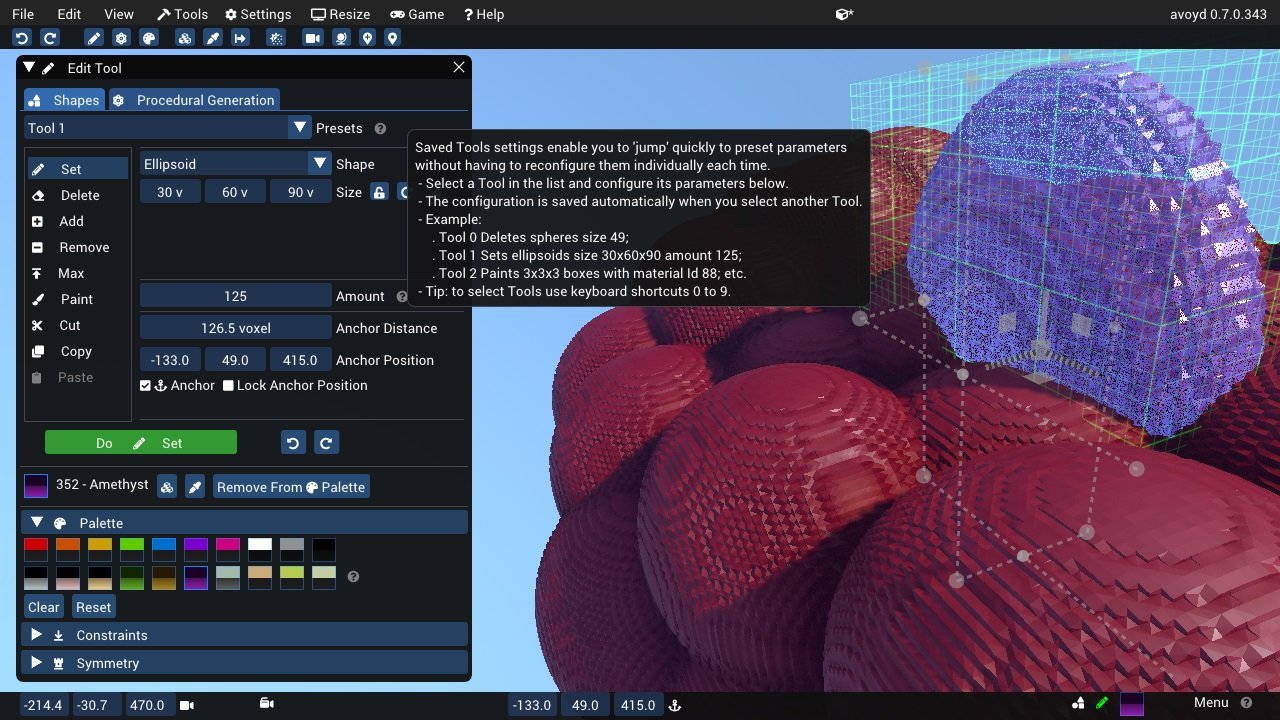
Here's an application using icons ("Avoyd", https://www.avoyd.com):
|
|
|
|
|
|
##### [Return to Index](#index)
|
|
|
|
---------------------------------------
|
|
|
|
### Excluding Overlapping Ranges
|
|
|
|
🆕 **Since 1.92, with an up to date backend: glyphs ranges are ignored**: when loading a glyph, input fonts in the merge list are queried in order. The first font which has the glyph loads it.
|
|
<BR>‼️ **If you are merging several fonts, you may have undesirable overlapping ranges.** You can use `ImFontConfig::GlyphExcludeRanges[] `to specify ranges to ignore in a given Input.
|
|
|
|
```cpp
|
|
// Add Font Source 1 but ignore ICON_MIN_FA..ICON_MAX_FA range
|
|
static ImWchar exclude_ranges[] = { ICON_MIN_FA, ICON_MAX_FA, 0 };
|
|
ImFontConfig cfg1;
|
|
cfg1.GlyphExcludeRanges = exclude_ranges;
|
|
io.Fonts->AddFontFromFileTTF("segoeui.ttf", 0.0f, &cfg1);
|
|
|
|
// Add Font Source 2, which expects to use the range above
|
|
ImFontConfig cfg2;
|
|
cfg2.MergeMode = true;
|
|
io.Fonts->AddFontFromFileTTF("FontAwesome4.ttf", 0.0f, &cfg2);
|
|
```
|
|
Another (silly) example:
|
|
```cpp
|
|
// Remove 'A'-'Z' from first font
|
|
static ImWchar exclude_ranges[] = { 'A', 'Z', 0 };
|
|
ImFontConfig cfg1;
|
|
cfg1.GlyphExcludeRanges = exclude_ranges;
|
|
io.Fonts->AddFontFromFileTTF("segoeui.ttf", 0.0f, &cfg1);
|
|
|
|
// Load another font to fill the gaps
|
|
ImFontConfig cfg2;
|
|
cfg2.MergeMode = true;
|
|
io.Fonts->AddFontFromFileTTF("Roboto-Medium.ttf", 0.0f, &cfg2);
|
|
```
|
|

|
|
|
|
You can use `Metrics/Debugger->Fonts->Font->Input Glyphs Overlap Detection Tool` to see list of glyphs available in multiple font sources. This can facilitate understanding which font input is providing which glyph.
|
|
|
|
##### [Return to Index](#index)
|
|
|
|
---------------------------------------
|
|
|
|
## Using FreeType Rasterizer (imgui_freetype)
|
|
|
|
- Dear ImGui uses [stb_truetype.h](https://github.com/nothings/stb/) to rasterize fonts (with optional oversampling). This technique and its implementation are not ideal for fonts rendered at small sizes, which may appear a little blurry or hard to read.
|
|
- You can however use `imgui_freetype.cpp` from the [misc/freetype/](https://github.com/ocornut/imgui/tree/master/misc/freetype) folder. Compile with this file and add `#define IMGUI_ENABLE_FREETYPE` to your imconfig.h file or build system to automatically activate it.
|
|
- FreeType supports auto-hinting which tends to improve the readability of small fonts. It makes a big difference especially at smaller resolutions.
|
|
- Read documentation in the [misc/freetype/](https://github.com/ocornut/imgui/tree/master/misc/freetype) folder.
|
|
- Correct sRGB space blending will have an important effect on your font rendering quality.
|
|
|
|
##### [Return to Index](#index)
|
|
|
|
---------------------------------------
|
|
|
|
## Using Colorful Glyphs/Emojis
|
|
|
|
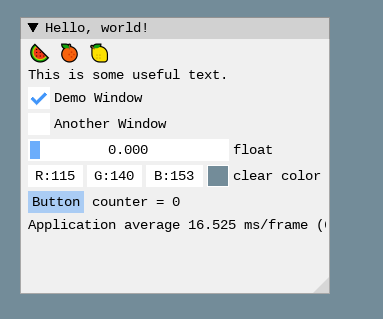
- Rendering of colored emojis is supported by imgui_freetype with FreeType 2.10+.
|
|
- You will need to load fonts with the `ImGuiFreeTypeBuilderFlags_LoadColor` flag.
|
|
- Emojis are frequently encoded in upper Unicode layers (character codes >0x10000) and will need dear imgui compiled with `IMGUI_USE_WCHAR32`.
|
|
- Not all types of color fonts are supported by FreeType at the moment.
|
|
- Stateful Unicode features such as skin tone modifiers are not supported by the text renderer.
|
|
|
|
|
|
|
|
```cpp
|
|
io.Fonts->AddFontFromFileTTF("../../../imgui_dev/data/fonts/NotoSans-Regular.ttf", 16.0f);
|
|
static ImWchar ranges[] = { 0x1, 0x1FFFF, 0 };
|
|
static ImFontConfig cfg;
|
|
cfg.MergeMode = true;
|
|
cfg.FontLoaderFlags |= ImGuiFreeTypeLoaderFlags_LoadColor;
|
|
io.Fonts->AddFontFromFileTTF("C:\\Windows\\Fonts\\seguiemj.ttf", 16.0f, &cfg);
|
|
```
|
|
|
|
##### [Return to Index](#index)
|
|
|
|
---------------------------------------
|
|
|
|
## Using Custom Glyph Ranges
|
|
|
|
🆕 **Since 1.92, with an up to date backend: specifying glyph ranges is unnecessary. Therefore this is not really useful any more.**
|
|
|
|
:rewind: You can use the `ImFontGlyphRangesBuilder` helper to create glyph ranges based on text input. For example: for a game where your script is known, if you can feed your entire script to it and only build the characters the game needs.
|
|
```cpp
|
|
ImVector<ImWchar> ranges;
|
|
ImFontGlyphRangesBuilder builder;
|
|
builder.AddText("Hello world"); // Add a string (here "Hello world" contains 7 unique characters)
|
|
builder.AddChar(0x7262); // Add a specific character
|
|
builder.AddRanges(io.Fonts->GetGlyphRangesJapanese()); // Add one of the default ranges
|
|
builder.BuildRanges(&ranges); // Build the final result (ordered ranges with all the unique characters submitted)
|
|
|
|
io.Fonts->AddFontFromFileTTF("myfontfile.ttf", size_in_pixels, nullptr, ranges.Data);
|
|
io.Fonts->Build(); // Build the atlas while 'ranges' is still in scope and not deleted.
|
|
```
|
|
|
|
##### [Return to Index](#index)
|
|
|
|
---------------------------------------
|
|
|
|
## Using Custom Colorful Icons
|
|
|
|
🆕 **Since 1.92, with an up to date backend: this system has been revamped.**
|
|
|
|
TL;DR; With the new system, it is recommended that you create a custom `ImFontLoader` and register your fonts with it.
|
|
`AddCustomRectFontGlyph()` has been obsoleted because its API does not make much sense with resizable fonts.
|
|
|
|
You can ask questions in [#8466](https://github.com/ocornut/imgui/issues/8466).
|
|
|
|
:rewind: **Before 1.92:**
|
|
|
|
As an alternative to rendering colorful glyphs using imgui_freetype with `ImGuiFreeTypeBuilderFlags_LoadColor`, you may allocate your own space in the texture atlas and write yourself into it. **(This is a BETA api, use if you are familiar with dear imgui and with your rendering backend)**
|
|
|
|
- You can use the `ImFontAtlas::AddCustomRect()` and `ImFontAtlas::AddCustomRectFontGlyph()` api to register rectangles that will be packed into the font atlas texture. Register them before building the atlas, then call Build()`.
|
|
- You can then use `ImFontAtlas::GetCustomRect(int)` to query the position/size of your rectangle within the texture, and blit/copy any graphics data of your choice into those rectangles.
|
|
- This API is beta because it is likely to change in order to support multi-dpi (multiple viewports on multiple monitors with varying DPI scale).
|
|
|
|
#### Pseudo-code:
|
|
```cpp
|
|
// Add font, then register two custom 13x13 rectangles mapped to glyph 'a' and 'b' of this font
|
|
ImFont* font = io.Fonts->AddFontDefault();
|
|
int rect_ids[2];
|
|
rect_ids[0] = io.Fonts->AddCustomRectFontGlyph(font, 'a', 13, 13, 13+1);
|
|
rect_ids[1] = io.Fonts->AddCustomRectFontGlyph(font, 'b', 13, 13, 13+1);
|
|
|
|
// Build atlas
|
|
io.Fonts->Build();
|
|
|
|
// Retrieve texture in RGBA format
|
|
unsigned char* tex_pixels = nullptr;
|
|
int tex_width, tex_height;
|
|
io.Fonts->GetTexDataAsRGBA32(&tex_pixels, &tex_width, &tex_height);
|
|
|
|
for (int rect_n = 0; rect_n < IM_COUNTOF(rect_ids); rect_n++)
|
|
if (const ImTextureRect* rect = io.Fonts->GetCustomRect(rect_ids[rect_n]))
|
|
{
|
|
// Fill the custom rectangle with red pixels (in reality you would draw/copy your bitmap data here!)
|
|
for (int y = 0; y < rect->Height; y++)
|
|
{
|
|
ImU32* p = (ImU32*)tex_pixels + (rect->Y + y) * tex_width + (rect->X);
|
|
for (int x = rect->Width; x > 0; x--)
|
|
*p++ = IM_COL32(255, 0, 0, 255);
|
|
}
|
|
}
|
|
```
|
|
|
|
##### [Return to Index](#index)
|
|
|
|
---------------------------------------
|
|
|
|
## About Filenames
|
|
|
|
**Please note that many new C/C++ users have issues loading their files _because the filename they provide is wrong_ due to incorrect assumption of what is the current directory.**
|
|
|
|
Two things to watch for:
|
|
|
|
(1) In C/C++ and most programming languages if you want to use a backslash `\` within a string literal, you need to write it double backslash `\\`. At it happens, Windows uses backslashes as a path separator, so be mindful.
|
|
```cpp
|
|
io.Fonts->AddFontFromFileTTF("MyFiles\MyImage01.jpg", ...); // This is INCORRECT!!
|
|
io.Fonts->AddFontFromFileTTF("MyFiles\\MyImage01.jpg", ...); // This is CORRECT
|
|
```
|
|
In some situations, you may also use `/` path separator under Windows.
|
|
|
|
(2) Make sure your IDE/debugger settings starts your executable from the right working (current) directory. In Visual Studio you can change your working directory in project `Properties > General > Debugging > Working Directory`. People assume that their execution will start from the root folder of the project, where by default it often starts from the folder where object or executable files are stored.
|
|
```cpp
|
|
io.Fonts->AddFontFromFileTTF("MyImage01.jpg", ...); // Relative filename depends on your Working Directory when running your program!
|
|
io.Fonts->AddFontFromFileTTF("../MyImage01.jpg", ...); // Load from the parent folder of your Working Directory
|
|
```
|
|
##### [Return to Index](#index)
|
|
|
|
---------------------------------------
|
|
|
|
## About UTF-8 Encoding
|
|
|
|
**For non-ASCII characters display, a common user issue is not passing correctly UTF-8 encoded strings.**
|
|
|
|
(1) We provide a function `ImGui::DebugTextEncoding(const char* text)` which you can call to verify the content of your UTF-8 strings.
|
|
This is a convenient way to confirm that your encoding is correct.
|
|
|
|
```cpp
|
|
ImGui::SeparatorText("CORRECT");
|
|
ImGui::DebugTextEncoding(u8"こんにちは");
|
|
|
|
ImGui::SeparatorText("INCORRECT");
|
|
ImGui::DebugTextEncoding("こんにちは");
|
|
```
|
|

|
|
|
|
You can also find this tool under `Metrics/Debuggers->Tools->UTF-8 Encoding viewer` if you want to paste from clipboard, but this won't validate the UTF-8 encoding done by your compiler.
|
|
|
|
(2) To encode in UTF-8:
|
|
|
|
There are also compiler-specific ways to enforce UTF-8 encoding by default:
|
|
|
|
- Visual Studio compiler: `/utf-8` command-line flag.
|
|
- Visual Studio compiler: `#pragma execution_character_set("utf-8")` inside your code.
|
|
- Since May 2023 we have changed the Visual Studio projects of all our examples to use `/utf-8` ([see commit](https://github.com/ocornut/imgui/commit/513af1efc9080857bbd10000d98f98f2a0c96803)).
|
|
|
|
Or, since C++11, you can use the `u8"my text"` syntax to encode literal strings as UTF-8. e.g.:
|
|
```cpp
|
|
ImGui::Text(u8"hello");
|
|
ImGui::Text(u8"こんにちは"); // this will always be encoded as UTF-8
|
|
ImGui::Text("こんにちは"); // the encoding of this is depending on compiler settings/flags and may be incorrect.
|
|
```
|
|
|
|
Since C++20, because the C++ committee hate its users, they decided to change the `u8""` syntax to not return `const char*` but a new type `const char8_t*` which doesn't cast to `const char*`.
|
|
Because of type usage of `u8""` in C++20 is a little more tedious:
|
|
```cpp
|
|
ImGui::Text((const char*)u8"こんにちは");
|
|
```
|
|
However, you can disable this behavior completely using the compiler option [`/Zc:char8_t-`](https://learn.microsoft.com/en-us/cpp/build/reference/zc-char8-t?view=msvc-170) for MSVC and [`-fno-char8_t`](https://www.open-std.org/jtc1/sc22/wg21/docs/papers/2019/p1423r3.html) for Clang and GCC.
|
|
##### [Return to Index](#index)
|
|
|
|
---------------------------------------
|
|
|
|
## Debug Tools
|
|
|
|
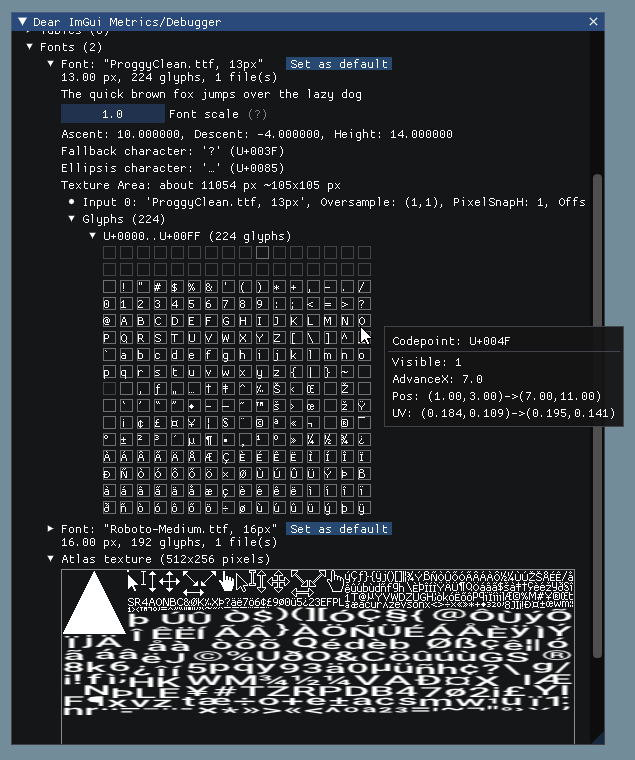
#### Metrics/Debugger->Fonts
|
|
You can use the `Metrics/Debugger` window (available in `Demo>Tools`) to browse your fonts and understand what's going on if you have an issue. You can also reach it in `Demo->Tools->Style Editor->Fonts`. The same information are also available in the Style Editor under Fonts.
|
|
|
|
|
|
|
|
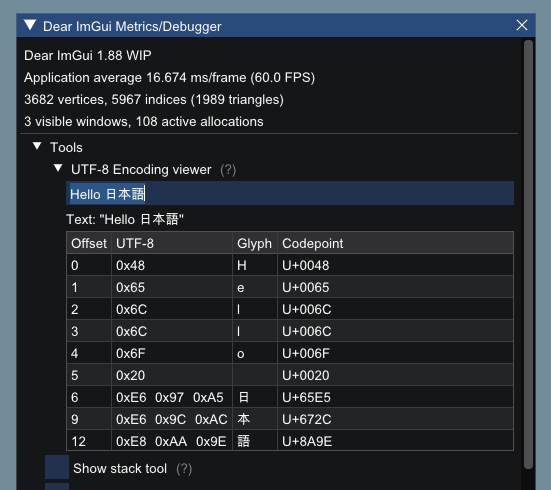
#### UTF-8 Encoding Viewer**
|
|
You can use the `UTF-8 Encoding viewer` in `Metrics/Debugger` to verify the content of your UTF-8 strings. From C/C++ code, you can call `ImGui::DebugTextEncoding("my string");` function to verify that your UTF-8 encoding is correct.
|
|
|
|
|
|
|
|
##### [Return to Index](#index)
|
|
|
|
---------------------------------------
|
|
|
|
## Credits/Licenses For Fonts Included In Repository
|
|
|
|
Some fonts files are available in the `misc/fonts/` folder:
|
|
|
|
**Roboto-Medium.ttf**, by Christian Robetson
|
|
<br>Apache License 2.0
|
|
<br>https://fonts.google.com/specimen/Roboto
|
|
|
|
**Cousine-Regular.ttf**, by Steve Matteson
|
|
<br>Digitized data copyright (c) 2010 Google Corporation.
|
|
<br>Licensed under the SIL Open Font License, Version 1.1
|
|
<br>https://fonts.google.com/specimen/Cousine
|
|
|
|
**DroidSans.ttf**, by Steve Matteson
|
|
<br>Apache License 2.0
|
|
<br>https://www.fontsquirrel.com/fonts/droid-sans
|
|
|
|
**ProggyClean.ttf**, by Tristan Grimmer
|
|
<br>MIT License
|
|
<br>(recommended loading setting: Size = 13.0, GlyphOffset.y = +1)
|
|
<br>https://github.com/bluescan/proggyfonts
|
|
|
|
**ProggyTiny.ttf**, by Tristan Grimmer
|
|
<br>MIT License
|
|
<br>(recommended loading setting: Size = 10.0, GlyphOffset.y = +1)
|
|
<br>https://github.com/bluescan/proggyfonts
|
|
|
|
**ProggyVector.ttf**, by Tristan Grimmer, Source Foundry Authors
|
|
<BR>MIT License + Bitstream Vera License
|
|
<BR>https://github.com/bluescan/proggyfonts
|
|
|
|
**Karla-Regular.ttf**, by Jonathan Pinhorn
|
|
<br>SIL OPEN FONT LICENSE Version 1.1
|
|
|
|
##### [Return to Index](#index)
|
|
|
|
## Font Links
|
|
|
|
#### ICON FONTS
|
|
|
|
- C/C++ header for icon fonts (#define with code points to use in source code string literals) https://github.com/juliettef/IconFontCppHeaders
|
|
- FontAwesome https://fortawesome.github.io/Font-Awesome
|
|
- OpenFontIcons https://github.com/traverseda/OpenFontIcons
|
|
- Google Icon Fonts https://design.google.com/icons/
|
|
- Kenney Icon Font (Game Controller Icons) https://github.com/nicodinh/kenney-icon-font
|
|
- IcoMoon - Custom Icon font builder https://icomoon.io/app
|
|
|
|
#### REGULAR FONTS
|
|
|
|
- Google Noto Fonts (worldwide languages) https://www.google.com/get/noto/
|
|
- Open Sans Fonts https://fonts.google.com/specimen/Open+Sans
|
|
- (Japanese) M+ fonts by Coji Morishita http://mplus-fonts.sourceforge.jp/mplus-outline-fonts/index-en.html
|
|
|
|
#### MONOSPACE FONTS
|
|
|
|
<img width="1172" height="715" alt="image" src="https://github.com/user-attachments/assets/c9702534-4877-41c9-ae0d-252933c26ced" />
|
|
|
|
- Proggy Fonts, by Tristan Grimmer https://github.com/bluescan/proggyfonts
|
|
- Sweet16, Sweet16 Mono, by Martin Sedlak (Latin + Supplemental + Extended A) https://github.com/kmar/Sweet16Font
|
|
- Google Noto Mono Fonts: https://www.google.com/get/noto/
|
|
- Typefaces for source code beautification: https://github.com/chrissimpkins/codeface
|
|
- Programmation fonts: http://s9w.github.io/font_compare/
|
|
- Inconsolata: http://www.levien.com/type/myfonts/inconsolata.html
|
|
- Adobe Source Code Pro: Monospaced font family for ui & coding environments https://github.com/adobe-fonts/source-code-pro
|
|
- Monospace/Fixed Width Programmer's Fonts http://www.lowing.org/fonts/
|
|
|
|
Or use Arial Unicode or other Unicode fonts provided with Windows for full characters coverage (not sure of their licensing).
|
|
|
|
##### [Return to Index](#index)
|